| images | ||
| scripts | ||
| styles | ||
| .gitignore | ||
| auth.js | ||
| configs.js | ||
| get_token.txt | ||
| index.html | ||
| LICENSE | ||
| README.md | ||

Multi-Task widget Infinity (PRIVATE)
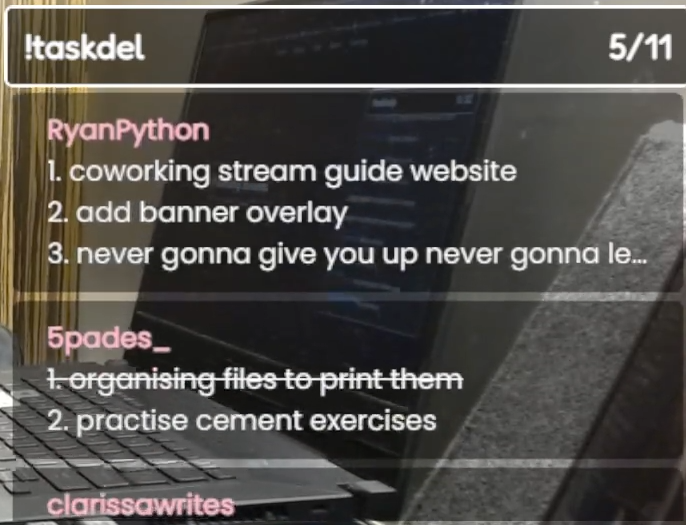
It's basically the same as the original "Multi-Task widget" but with infinite scroll! (more aesthetic, hehe)
Logs
I'll just update you guys on the Discord
Content
Commands
Moderators only
- !clear - Clear all tasks
- !cleardone - Clear all done tasks
- !adel @user - Remove all tasks from a user
Installation
Method 1 (fastest, easiest way)
-
Install the zip or clone the repository
-
Go to https://twitchapps.com/tmi/ to create an oauth token (it acts as a password)
-
Setup authentication in
auth.js -
Setup
Browser Sourcein OBS studio or other streaming software with the following settings:
- Local File:
checked - Local File:
index.html
Method 2 (better if you're using an alt account as a bot)
-
Install the zip or clone the repository
-
Create a Twitch application here
Log in with your alternate Twitch account if you wish to use a different account as a bot account -
Copy the
Client IDfrom the application -
Create token using
get_token.txt. ReplaceCLIENT_IDwith theClient IDfrom the application -
Setup authentication in
auth.js -
Setup
Browser Sourcein OBS studio or other streaming software with the following settings:
- Local File:
checked - Local File:
index.html
Customization settings
Edit configs.js to edit the style of the task list
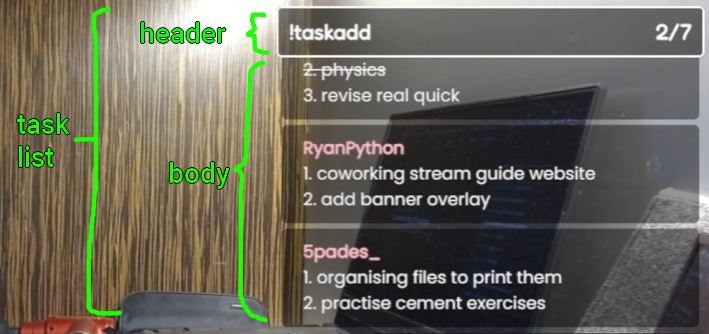
settings
showDoneTasks:
true: show the done tasks
false: hide (and remove) the done tasks
enableLimit:
true: limit the number of incomplete tasks stored in the list
false: unlimited incomplete tasks
limit: The number of incomplete tasks to store in the list (integer)
OneScrollPerMS: Per MS, how many pixels to scroll (integer)
pauseBetweenScrolls: How many MS to pause between each end of the scroll (integer)
task list styles
taskListWidth: width of the task list (px)
taskListHeight: height of the task list (px)
taskListBackgroundColor: background color of the task list (hex only)
taskListBackgroundOpacity: opacity of the task list background (0.0 - 1.0)
taskListBorderWidth: width of the task list border (px)
taskListBorderColor: color of the task list border (hex or name)
taskListBorderRadius: how round the task list border should be (px)
taskListHorizontalPadding: horizontal padding of the task list (px)
taskListVerticalPadding: vertical padding of the task list (px)
header
headerBackgroundColor: background color of the header (hex only)
headerBackgroundOpacity: opacity of the header background (0.0 - 1.0)
headerBorderWidth: width of the header border (px)
headerBorderColor: color of the header border (hex or name)
headerBorderRadius: how round the header border should be (px)
headerFontFamily: font family of the header (font name)
headerGoogleFont: whether to use Google font for the header (true or false)
headerFontSize: font size of the header (px)
headerFontWeight: font weight of the header (normal, bold, or number)
headerFontColor: font color of the header (hex or name)
body
bodyBackgroundColor: background color of the body (hex only)
bodyBackgroundOpacity: opacity of the body background (0.0 - 1.0)
bodyBorderWidth: width of the body border (px)
bodyBorderColor: color of the body border (hex or name)
bodyBorderRadius: how round the body border should be (px)
task
lineHeight: line height of the task (number)
usernameFontWeight: font weight of the username (normal, bold, or number)
usernameColor: color of the username (hex or name or "" for Twitch user color)
taskBackgroundColor: background color of the task (hex only)
taskBackgroundOpacity: opacity of the task background (0.0 - 1.0)
taskFontFamily: font family of the task (font name)
taskGoogleFont: whether to use Google font for the task (true or false)
taskFontSize: font size of the task (px)
taskFontColor: font color of the task (hex or name)
taskBorderColor: color of the task border (hex or name)
taskBorderWidth: width of the task border (px)
taskBorderRadius: how round the task border should be (px)
taskMarginBottom: bottom margin of the task (px)
taskHorizontalPadding: horizontal padding of the task (px)
taskVerticalPadding: vertical padding of the task (px)
Credits
Author: @RyanPython
Special thanks to:
- @Instafluff
for the Comfy JS library